Cover Letter Spacing: Line, Margin and Font Settings
Single space your cover letter with one blank line between paragraphs, 1 inch margins and an 11 or 12 point font. Every setting in one table, with Word and Google Docs steps.
TL;DR: Single space the body of your cover letter, leave one blank line between paragraphs, and use 1 inch margins with an 11 or 12 point font. Keep the whole letter to one page. Do not double space it: double spacing is for academic papers, not business letters.
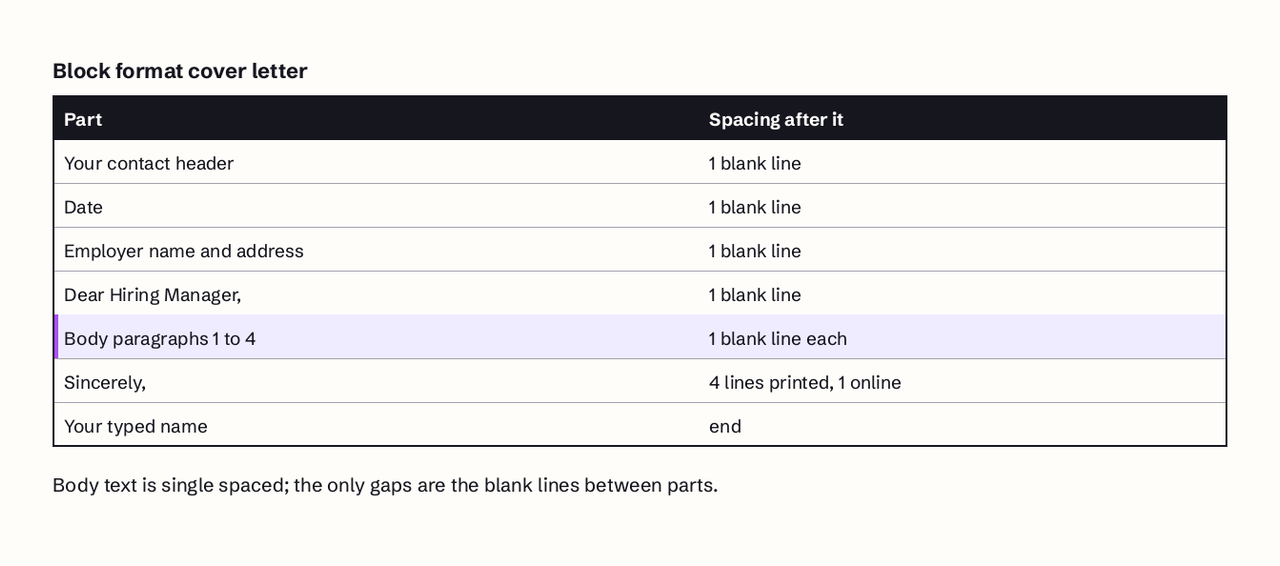
Cover letter spacing follows the standard business letter rules. The body is single spaced with one blank line (or about 12 points of space) between paragraphs, everything is left aligned, margins are 1 inch on all sides, and the font is a readable 10 to 12 point typeface such as Times New Roman, Arial, Calibri or Aptos. The Purdue Online Writing Lab describes block format, the most common business letter layout, as "left justified and single spaced except for a double space between paragraphs," and MIT's career office asks for one page in a 10 to 12 point font. Below is every setting in one table, then the exact menu clicks to apply each one in Microsoft Word and Google Docs.
Cover letter spacing cheat sheet
This table is the whole answer. Each row has a short section further down with the reason and the exact steps.
| Setting | Use this | Acceptable range | Avoid |
|---|---|---|---|
| Line spacing (body) | Single (100%) | 100% to 115% | Double (200%) |
| Space between paragraphs | One blank line or 12 pt after | 6/12 pt after | No gap, or two blank lines |
| Paragraph indent | None (block format) | First line indent only in indented style | Indent plus blank line |
| Alignment | Left aligned | Left aligned | Justified, centered body |
| Margins | 1 inch (2.54 cm) on all sides | 0.75 to 1 inch | Under 0.5 inch |
| Font size (body) | 11/12 pt | 10 to 12 pt | Under 10 pt, over 12 pt |
| Font | Times New Roman, Arial, Calibri, Aptos, Georgia | Any plain serif or sans serif | Script or display fonts |
| Space after salutation | One blank line | One blank line | None |
| Space before signature (printed) | Four lines for a signature | Three to four lines | No room to sign |
| Space before signature (email or upload) | One blank line | One blank line | Four empty lines |
| Length | One page per letter, 250 to 400 words | 3 to 4 body paragraphs | Spilling onto page two |
Should a cover letter be single or double spaced?
A cover letter should be single spaced. Single spacing with a blank line between paragraphs is the block format that Purdue OWL calls the most common business letter layout, and it is what recruiters expect to see. Purdue's instruction for block and modified block letters is direct: "single space and left justify each paragraph within the body of the letter. Leave a blank line between each paragraph."
Double spacing has two real costs. First, it cuts what fits on a page by about 50%, so a normal 350 word letter jumps onto a second page and breaks the one page rule. Second, it signals an academic paper. People ask about double spacing because school assignments (MLA and APA essays) are double spaced, but those style guides are for papers read and marked up by teachers, not for letters read in a few seconds by a recruiter.
The one common exception is 1.15 spacing, which gives each line 15% more height than single spacing (1.5 spacing is 150% and double is 200%). If you write in Google Docs, new documents usually start at 1.15, and many modern Word templates use a value slightly above 1.0. A letter at 1.15 still reads as single spaced and no recruiter will notice the difference. Only switch to exactly 1.0 if you need the room to keep the letter on one page.
If a job post or application portal explicitly asks for double spacing (rare, but some academic and government applications do), follow the instruction. A specific request beats every general rule here.
How much space goes between paragraphs?
Put one blank line between paragraphs, and no extra space inside them. In practice that means either pressing Enter twice at the end of each paragraph with paragraph spacing set to 0, or pressing Enter once with "space after" set to about 12 points per paragraph (the height of one line at 12 point). Choose one method and use it everywhere; mixing them is how letters end up with uneven gaps.
Do not indent the first line when you use blank lines. Block format uses blank lines instead of indents, and doing both looks like a draft. The older indented style (first line indent of 0.5 inch, no blank line between paragraphs) is still correct, but it is rarely used now and does not survive email or plain text application fields well.
The space after paragraphs is also your best tool for fitting a letter on one page. Dropping from 12 pt to 6 pt after each paragraph saves 6 points per paragraph, about 50% of each gap, and can recover several lines without touching the font size or margins.
What margins work best?
Use 1 inch (2.54 cm) margins on all four sides. On A4 paper, 2.5 cm margins are the usual equivalent. On US Letter paper (8.5 by 11 inches) that leaves a 6.5 by 9 inch text area, room for roughly 45 to 50 lines per page of 12 point single spaced text. That is the default page setup in both Microsoft Word and Google Docs for US Letter paper, so most people need to change nothing. If your letter is a few lines too long, you can narrow the margins to 0.75 inch, but go no lower than 0.5 inch: below that the page looks crammed, and some printers clip text near the edge.
Keep the margins the same as your resume if you can. A matching resume and letter (same margins, font and header) look like one application rather than two documents from different templates. Purdue OWL also notes that the date line in a traditional printed business letter sits about two inches from the top of the page. Few people do this for emailed or uploaded letters, and it is safe to skip unless you are mailing a printed letter.
What font size and typeface are best?
Use an 11 or 12 point body font. MIT's career office sets the range at 10 to 12 point for a one page letter, and Purdue OWL names Times New Roman at 12 point as the generally accepted choice, with Arial acceptable as well. Ten point is a last resort for squeezing a long letter onto one page; at that size many fonts become hard to read on paper.
Any plain, widely installed font works:
- Serif: Times New Roman, Georgia, Garamond, Cambria.
- Sans serif: Arial, Calibri, Aptos, Helvetica.
Aptos became the default Microsoft Office font in 2023, replacing Calibri, so a new Word document today usually opens in Aptos. That is a fine choice. The bigger rule is consistency: use the same font as your resume, one font for the whole letter, and bold only for your name in the header. Font sizes also differ between typefaces. Twelve point Times New Roman sets noticeably more words per line than 12 point Arial, which is one reason serif fonts help when a letter runs long.
How do I set it up in Microsoft Word?
Word's settings live in two places: the Design tab for the whole document and the Paragraph dialog for exact values. These steps follow Microsoft's line spacing help page.
- Press Ctrl + A (Cmd + A on a Mac) to select the whole letter.
- Go to Home, then Line and Paragraph Spacing, then Line Spacing Options.
- Under Spacing, set Line spacing to Single.
- Set Before / After to 0 pt / 12 pt (or 0 pt if you prefer to press Enter twice between paragraphs).
- Set Indentation Special to (none) for block format, then click OK.
- For margins, go to Layout, then Margins, and choose Normal (1 inch on every side).
- Set the font and size in the Home tab font boxes, for example Aptos or Times New Roman at 11 or 12.
A shortcut for single spacing the entire document is Design, then Paragraph Spacing, then No Paragraph Space. Microsoft notes this overrides your current style set, and you can return to the original under the same menu. On a Mac, if your closing and name split across two pages, select the closing paragraph and use Format, then Paragraph, then Line and Page Breaks, then Keep with next.
How do I set it up in Google Docs?
Google Docs puts every spacing option under one menu. These steps follow Google's paragraph formatting help.
- Press Ctrl + A (Cmd + A on a Mac) to select the letter.
- Open Format, then Line and paragraph spacing. The keyboard shortcut for the Format menu is Alt + Shift + O on Windows and Chrome OS, or Control + Option + O on a Mac.
- Click Single (or leave it at 1.15).
- Choose Custom spacing and set Before to 0 and After to 12, then click Apply (0 / 12 points).
- For margins, go to File, then Page setup, make sure Pages (not Pageless) is selected, and set all four margins to 1 inch.
- Pick the font and size from the toolbar.
- Download as PDF (File, then Download, then PDF document) and open the file to check the page count.
One catch: Google's page setup help notes that margins and page settings are not available in pageless format. If you can't find the margin boxes, switch the document to Pages first. A pageless draft also hides whether your letter has spilled onto a second page.
How should spacing look in an email?
An email cover letter drops the address block and date but keeps the same spacing logic: short single spaced paragraphs with one blank line between them. Put the job title in the subject line, start with the salutation, and end with your name and contact line with no blank lines reserved for a handwritten signature. Email clients strip custom fonts and margins anyway, so the blank lines between paragraphs are the only spacing you control.
The same applies to plain text fields in application portals. Paste the letter in as text, check that the blank lines survived, and add them back by hand if the field collapsed them into one block. If you are not sure who to address it to, see our guide on who to address a cover letter to if unknown.
How long should it be, and how do you fit one page?
A cover letter should fit on one page: usually 250 to 400 words in three or four body paragraphs, or roughly 60 to 100 words per paragraph. That is the length MIT's one page guidance and the 1 inch margin, 11 to 12 point setup produce naturally. If your letter needs more room, cut words before you cut spacing. Recruiters skim, and a dense page with half inch margins and 10 point type is harder to skim than a shorter letter with normal spacing.
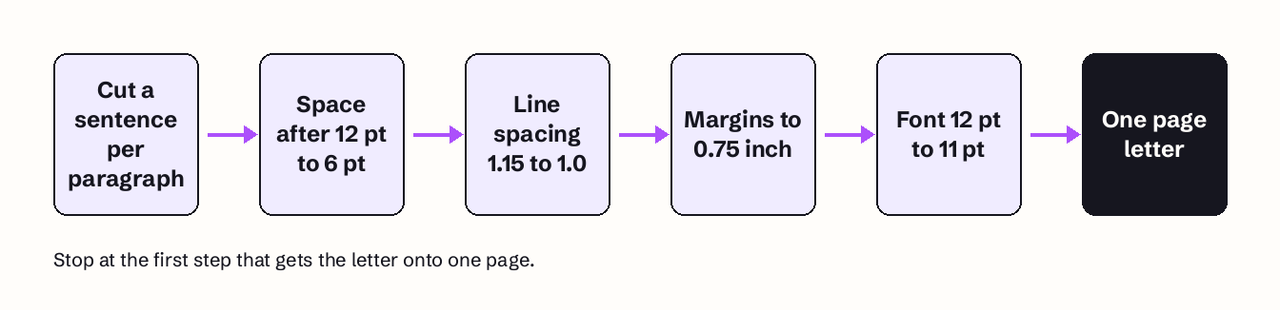
When the letter runs a few lines long, fix it in this order:
- Cut one sentence from each body paragraph.
- Reduce space after paragraphs from 12 pt to 6 pt.
- Switch from 1.15 to 1.0 line spacing, about 15% more lines per page.
- Narrow margins to 0.75 inch, which widens each line by about 8%.
- Drop the font from 12 pt to 11 pt, about 8% smaller type.
The same logic applies to resumes; our guide to how long a resume should be covers page counts by career stage.
Before you send: final check
Run through this list before you export the PDF:
- Body is single spaced (1.0 or 1.15), not double.
- Exactly one blank line between paragraphs, and no first line indents.
- Everything is left aligned, including the date and closing in block format.
- Margins are 1 inch (0.75 inch minimum).
- One font per document, at 11 or 12 point, matching your resume.
- One page per letter: it fits on one page with no lone line or signature on page two.
- Printed letters leave about four lines for a signature; emailed or uploaded letters leave one.
- The file is a PDF named with your name and the role, for example Priya-Shah-Cover-Letter-Data-Analyst.pdf.
Spacing gets the letter read; the content gets the interview. Once the format is right, the next problem is writing a version for each job without starting from zero. JobFinder AI's cover letter generator drafts a letter for a specific job post from your resume, so you only have to edit and format it. If you are sending letters and still hearing nothing, our breakdown of why you are not getting interviews covers the problems formatting can't fix, and the free ATS resume checker flags layout issues in the resume you send with it.
FAQ
Should a cover letter be double spaced?
No. A cover letter should be single spaced with one blank line between paragraphs, which is the standard block business letter format. Double spacing pushes a normal letter onto two pages and makes it look like a school essay. Only double space if the employer explicitly asks for it.
Is 1.15 line spacing okay for a cover letter?
Yes. 1.15 reads as single spacing and is the starting setting in Google Docs, so it is a safe choice. Switch to exactly 1.0 only if you need a few more lines to keep the letter on one page.
What is the best font size for a cover letter?
Eleven or 12 point for the body text. MIT's career office recommends 10 to 12 point for a one page letter. Your name in the header can be larger, around 14 to 16 point, but keep the body in one size.
Should cover letter paragraphs be indented?
Not in block format, which is the style most people use today. Block format uses a blank line between paragraphs and no indents. If you choose the older indented style, indent the first line by 0.5 inch and remove the blank lines, but never use both.
Should the cover letter match my resume formatting?
Yes. Use the same font, margins and header on both documents so they read as one application. A matching header with your name, phone, email and LinkedIn URL also makes the letter easy to connect to your resume if the two get separated.
How many lines go between the closing and my name?
On a printed letter, leave about four lines between the closing (such as Sincerely) and your typed name so there is room to sign, as Purdue OWL describes. On an emailed or uploaded letter, leave one blank line or none, because nobody signs it by hand.