Request for Informational Interview Template (5 Emails)
Five copy-ready templates for requesting an informational interview by email or LinkedIn, plus how long to make it and when to follow up.
TL;DR: A good request for an informational interview is a plain email under 100 words: one line on who you are, one line on why this person, and one question asking for 20 minutes. Never mention a job in it. If they do not reply in 7 business days, follow up once, then move on.
Here is the template that works in most cases. Subject line: "Request for informational interview" or "Fellow [school] grad, question about [team]." Body: "Hi [Name], I'm a [your current role or background] exploring [field]. I found you through [shared link: alumni network, mutual contact, their talk or article], and your move from [their past role] to [their current role] is exactly the path I'm trying to understand. If your schedule allows, would you have 20 minutes for a call in the next few weeks? Thanks, [Your name]." That is 64 words plus the bracketed details. Career centers that teach this format, built on Steve Dalton's The 2-Hour Job Search, recommend fewer than 75 to 100 words, no mention of jobs, and the shared connection first (Colorado State University, Simon Fraser University). The rest of this guide shows how to pick the person, adapt the template for five situations, and follow up without being a pest.
What you need before you send a request
You need three things before you write a word: a specific person, a real reason you chose them, and a question you cannot answer from their profile. Without those, no template will save the email.
- A named person, not a company. An informational interview is with someone, so pick one person whose job or path you want to understand: a team lead in the function you want, someone two to five years ahead of you, or someone who made the switch you are considering.
- A shared link. Alumni of your school, a mutual contact, the same previous employer, a professional group, or something they published. Colorado State's career center lists exactly these: the same school, a shared contact, a mutual LinkedIn group or a common professor.
- An address that reaches them. A work email, a LinkedIn message, or your school's alumni platform. Our guide to finding a hiring manager's email address covers the patterns and tools that work for any professional, not only hiring managers.
- Two or three real questions. If the answer is on their LinkedIn profile or company website, it is not a question for the call. MIT's career office keeps a list of suggested informational interview questions grouped by career path, work environment, industry and preparation; pick two that fit.
How do you ask for an informational interview by email?
Ask by email in five steps: choose the person, find the shared link, write three sentences, send it at a sensible time, and track the reply. Each step has one job.
- Choose one person per company. Writing to five people on the same team at once looks like a mass campaign. Start with the person whose path is closest to yours.
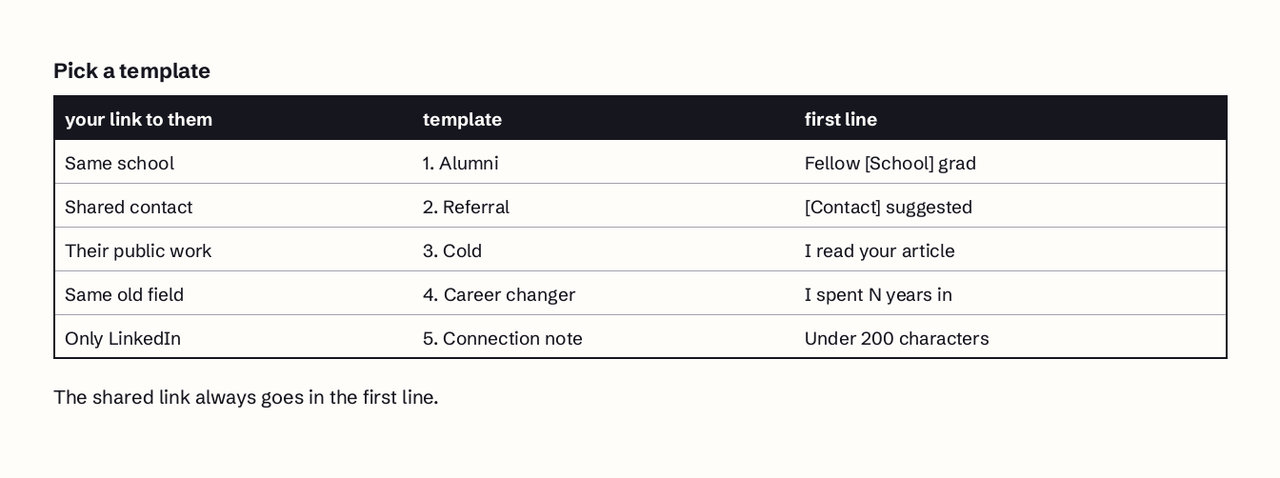
- Lead with the shared link. Put the connection in the first sentence: "I'm a fellow Michigan State alum" or "Priya Shah suggested I reach out." Simon Fraser University's guidance is blunt: the connection goes first.
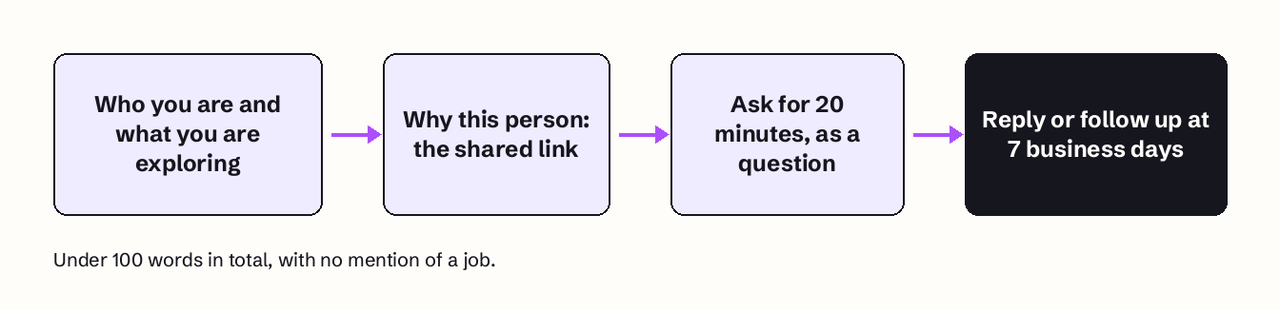
- Write exactly three sentences. Who you are and what you are exploring. Why them, specifically. The ask, as a question ending in a question mark, with a time limit: "Would you have 20 minutes for a call in the next few weeks?"
- Use a plain subject line. "Request for informational interview" works, and so does a subject that carries the shared link: "Fellow UT Austin grad, quick question about product ops." Avoid "Quick favor" or anything that looks like a sales email.
- Track it with two dates. Note the day you sent it, then set reminders for 3 and 7 business days. This is Dalton's 3B7 routine, explained in the follow-up section below.
The Yale course video below shows the same three-sentence structure in practice, including the subject line and the 20-minute ask.
A Yale lecturer explains the exact email formula they use to request informational interviews from strangers: a fixed subject line, three sentences (about you, about them, the 20-minute ask), and a follow-up after about a week if there is no reply.
Request for informational interview templates
How long should an informational interview request be? Keep it under 100 words, and under 75 if you can. Simon Fraser University's career centre sets fewer than 100 words, so the person can read the whole email on a phone screen without scrolling. Colorado State's guide, quoting The 2-Hour Job Search, suggests fewer than 75. Both rule out attaching a resume or pasting your career history into the first message.
Short works because the reader decides in seconds whether helping you is easy. A 60-word email with one clear question is easy to answer between meetings. A 300-word email reads like a cover letter, and a cover letter implies you want a job, which turns a favor into an obligation.
Each template below is under 75 words. Replace the brackets and cut anything that is not true for you.
1. Alumni (warmest cold email)
Subject: Fellow [School] grad, question about [team or field]
Hi [Name], I'm a fellow [School] grad ([year]) now working in [current field]. I saw you moved from [their previous role] into [their current role] at [Company], which is the switch I'm exploring. Would you have 20 minutes for a call in the next 14 days? I'd value your view on how you made the move.
Thanks, [Your name]
2. Referral from a mutual contact
Subject: [Mutual contact] suggested I reach out
Hi [Name], [Mutual contact] suggested I speak with you. I'm exploring [field] after [number] years in [current field], and [Mutual contact] said you know [specific area] better than anyone. Would you be open to a 20-minute call sometime in the next few weeks?
Best, [Your name]
Copy the mutual contact on the email or get their permission first; a name-drop the other person did not agree to backfires quickly.
3. Fully cold, based on their work
Subject: Your [talk, article or podcast] on [topic]
Hi [Name], I read your [article] on [topic], especially the point about [specific detail]. I'm a [your role] trying to understand how [their kind of team] works day to day. If your schedule allows, would you have 20 minutes for a call this month?
Thank you, [Your name]
4. Career changer
Subject: Question about moving from [old field] into [new field]
Hi [Name], I've spent [number] years in [old field] and I'm looking at a move into [new field]. Your path from [their previous field] caught my eye because it's the closest to mine I've found. Would you have 20 minutes to talk about what transferred and what didn't?
Thanks, [Your name]
For a longer version aimed at people who can hire, see our guide to cold emails when switching careers.
5. LinkedIn connection note
LinkedIn caps connection notes, so this one is under 200 characters:
Hi [Name], fellow [School] alum exploring [field]. Your move into [role] is the path I'm weighing. Open to a 20-minute call sometime this month?
Check your request before sending it
Run this check before you press send. Each item takes seconds and catches most of the reasons a request goes unanswered.
- The word count is under 100, ideally under 75, not counting the signature.
- The words "job," "position," "opening" and "hiring" do not appear anywhere.
- The ask is a question, ends in a question mark, and names a time limit such as 20 minutes.
- Every proper noun is spelled correctly, including the company.
- No attachment. You can share a resume later if they ask.
- The subject line would make sense to them if they read nothing else.
Most unanswered requests fail one of those checks. The common versions, and their fixes:
- Asking for a job. "I'd love to be considered for openings" turns advice into a hiring decision. Fix: ask only about their path and their work.
- Generic flattery. "I'm impressed by your career" could go to anyone. Fix: cite one thing they said, built or wrote.
- An open-ended ask. "Let me know if you're free sometime" is easy to ignore. Fix: ask for 20 minutes in a specific window.
- Overrunning the call. SFU says to stick to the 20 to 30 minutes you asked for. Fix: watch the clock and offer to end on time.
- No thank-you. UMBC's career center recommends a thank-you note within 24 hours. Fix: send it the same day, mention one thing you will act on, and ask if there is anyone else you should speak with.
What do you say on LinkedIn instead of email?
On LinkedIn, say the same thing in fewer characters. LinkedIn's help center says free members can add a personalized message to up to 3 per month of their connection requests, each up to 200 characters, while Premium members can personalize every request (LinkedIn Help, checked November 2026). That makes the note too small for three full sentences, so cut it to the shared link, the path you are curious about and the ask, as in template 5.
Two practical rules follow from those limits:
- Spend the free notes on your best contacts. With 3 personalized notes per month, use them for alumni and referrals, not cold names.
- Move to a message after they accept. Once you are connected, send a normal message with the full three-sentence request. If they do not accept within 7 days, use email if you can find a work address.
If you are deciding between the two channels, our comparison of email vs LinkedIn for job outreach covers reply patterns and when each one fits.
What if they do not reply?
Follow up once, at 7 business days, and contact someone else in the meantime. Dalton's 3B7 routine, as Simon Fraser University summarizes it, sets two reminders when you send the email: at 3 business days, if there is no reply, you reach out to the next person on your list; at 7 business days, you send one follow-up to the first contact. SFU advises following up only once and not taking silence personally. The Yale lecturer in the video above gives similar advice: follow up after a week or so.
Here is a follow-up that works, at 42 words:
Subject: Re: [original subject]
Hi [Name], I wanted to follow up on my note from last week. I know your schedule is full, so even 15 minutes would help. If now isn't a good time, no problem at all, and thank you for reading.
[Your name]
Reply in the same thread so they see the original request. After that, stop. A third email rarely helps and can cost you the relationship. If you want a version tailored to your situation, our free follow-up email generator drafts timing-aware variants.
Informational interviews are one channel in a wider plan; our guide to networking strategies for a job search shows where they fit alongside referrals and direct outreach.
Once a conversation tells you which teams and roles fit, the next step is finding open roles there and reaching the person who runs the team. JobFinder AI matches your resume to live job postings and helps you contact the hiring manager directly, so the insight from a 20-minute call turns into applications that reach a person. You can try JobFinder AI here.
FAQ
How do you ask for an informational interview by email?
Send a plain email under 100 words with three sentences: who you are and what you are exploring, why you chose this person, and a question asking for 20 minutes. Put the shared connection first, leave out any mention of jobs, and use a clear subject line such as "Request for informational interview."
How long should an informational interview request be?
Under 100 words, and under 75 if possible. Simon Fraser University's career centre says the email should fit on a phone screen without scrolling, and the 2-Hour Job Search method recommends fewer than 75 words. Do not attach a resume to the first message.
What if they do not reply to my informational interview request?
Wait 7 business days, then send one short follow-up in the same thread. In the meantime, after 3 business days, contact the next person on your list. If the follow-up gets no answer either, stop and focus on other contacts.
What do you say on LinkedIn instead of email?
Use a connection note under 200 characters with the shared link, the path you are curious about and a 20-minute ask. LinkedIn currently lets free members personalize up to three connection requests a month, so save notes for your strongest contacts and send the full request as a message after they accept.
Should I send my resume with an informational interview request?
No. Attaching a resume signals that you want a job, which makes the request harder to say yes to. Offer it later only if the person asks or suggests a role, and send it in a separate email.