RoboApply Reviews: 7 Auto Apply Tools Compared
RoboApply and six other auto apply bots compared on what you can verify: price, whether you review before submit, daily caps and where they apply.
TL;DR: RoboApply reviews split the same way every auto apply review splits: people who wanted volume are happy, people who wanted interviews from good-fit roles are not. The tools that earn their price let you review applications before they go out, publish their daily caps, and charge only for applications that actually submit. Of the seven tools below, AIApply, JobCopilot and LoopCV give you a real review step; Simplify leaves the final click to you.
If you searched "robo apply reviews", you are probably deciding whether an AI job application bot is worth paying for. The honest answer: auto apply bots work for one thing, putting your resume in front of more applicant tracking systems with less typing. They do not make a weak match strong, and a bot that sends 150 generic applications a day can hurt you in a narrow field where recruiters see your name repeatedly. This roundup compares RoboApply, LazyApply, JobCopilot, AIApply, LoopCV, Simplify and Jobright on things you can check yourself on each vendor's own pricing and help pages: price, whether you approve before submit, application caps, and where they apply. We left out affiliate ratings and testimonial counts.
How we judged these auto apply tools
We compared each tool on four criteria, all taken from first-party pricing pages, help articles or FAQs, read on November 7, 2026:
- Price and billing period. Weekly, monthly, yearly or credit packs. Credit packs that only charge on successful submission are cheaper than they look.
- Review before submit. Can you approve each application, or does the bot fire on its own? This is the single biggest predictor of whether you will be embarrassed by an application later.
- Application caps. A published daily or monthly limit tells you how the tool expects to be used.
- Where it applies. Company career pages, specific ATS platforms (Greenhouse, Workday, Lever), or job boards like Indeed and ZipRecruiter.
Where a vendor's pricing page blocked our reader or was missing, we say so and label third-party numbers as unverified. We did not rate support, reliability or interview rates, because we could not verify those.
Summary table: 7 auto apply bots compared
| Tool | Starting price (first-party unless noted) | Review before submit | Published cap | Where it applies |
|---|---|---|---|---|
| AIApply | $49/mo for 100 applications | Yes: Review or Hybrid mode | 100, 250 or 750 credits | Sites it can drive; others skipped free |
| JobCopilot | From $0.93/day | Yes: save for review | 20 or 50 matches/day | Company career pages |
| LoopCV | Free; paid from EUR 9.99/mo | Yes: manual review switch | Plan-based | 30+ job boards, email to recruiters |
| Simplify Copilot | Free autofill extension | You click submit | None (you apply) | 100+ portals incl. Workday, Greenhouse |
| Jobright | $39.99/mo Turbo (third-party report) | Autofill, you submit | Not verified | Its job feed plus autofill |
| LazyApply | $99/yr Basic | Not advertised | 15, 150 or 1,500/day | Greenhouse, Dice, Indeed, ZipRecruiter |
| RoboApply | Not verifiable (page blocked) | Not verified | 20/day Basic (third-party report) | Major job platforms |
1. AIApply
AIApply is an AI job application suite (resume builder, cover letters, interview help) with a credit-based Auto Apply feature.
- Best for: people who want automation but with a quality filter.
- Pricing: according to AIApply's help center, Auto Apply costs $49/month for 100 applications, $99/month for 250, or $199/quarter for 750. Tailored resume and cover letter add-ons cost $12/month each.
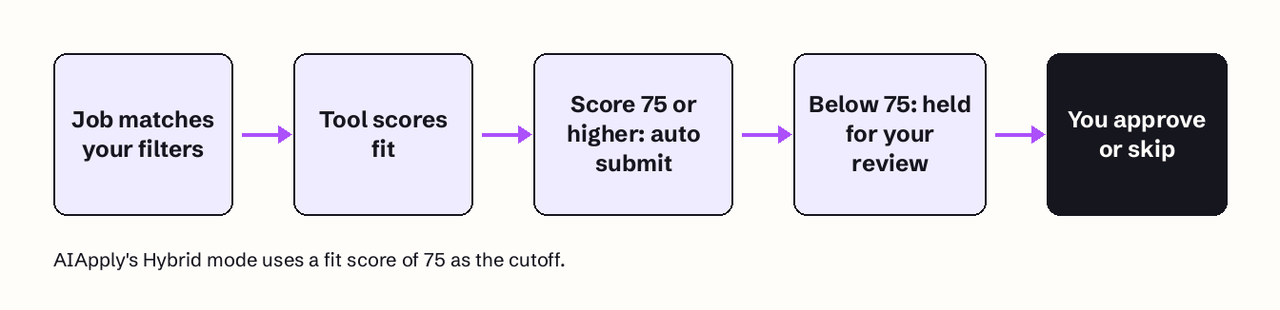
- Review step: three modes. Auto applies to every match. Hybrid "submits automatically for jobs with a fit score of 75 or higher" and holds lower scores for your review. Review mode needs your approval for every job.
- Verified detail: "A credit is only counted when an application is successfully submitted," and sites AIApply cannot drive are skipped with no credit charged (AIApply help center).
- Limits: credits cap you at 100 to 750 applications per billing period, which is a sane ceiling for most searches.
We compared it with our own approach in more depth in Jobfinder AI vs AIApply.
2. JobCopilot
JobCopilot runs one or more "copilots" that find and apply to jobs on official company career pages.
- Best for: applicants who want daily volume but on employer sites, not aggregators.
- Pricing: Premium starts from $0.93 per day with 1 copilot and up to 20 job matches daily. Elite starts from $1.05 per day with 3 copilots, up to 50 matches daily, per-application resume tailoring and credits to contact hiring managers. Weekly, monthly and quarterly plans are offered (JobCopilot pricing).
- Review step: both plans include "Save Job Applications for Review", and the homepage describes tailoring "with the option to review before applying".
- Limits: up to 50 applications per day on Elite.
Our side-by-side is in Jobfinder AI vs JobCopilot.
3. LoopCV
LoopCV is a European job search automation platform that applies through ATS forms, a browser extension, and emails to recruiters.
- Best for: testing auto apply without paying, and A/B testing CV versions.
- Pricing: a free forever plan with no credit card; paid plans start from EUR 9.99/month and raise daily application volume (LoopCV pricing).
- Review step: LoopCV says you "can also switch to manual review to approve each application," and you can exclude companies, locations and job boards.
- Verified detail: it scans 30+ job boards daily, and its extension applies on boards that need a login "without ever asking for your username or password."
- Limits: caps depend on the plan; the free plan sends a set number per day.
4. Simplify Copilot
Simplify Copilot is a free browser extension that autofills application forms; it is not a fully automatic bot.
- Best for: people who want to apply by hand, but faster.
- Pricing: the Copilot autofill extension is free to install.
- Review step: built in, because you submit each application yourself after the autofill.
- Verified detail: Simplify says Copilot autofills on over 100 job boards and portals, including Workday, Greenhouse, iCIMS, Taleo, Avature, Lever and SmartRecruiters (Simplify Copilot).
- Limits: none, because your own time is the limit.
If you are deciding between autofill and full automation, read which parts of a job search to automate.
5. Jobright
Jobright is an AI job matching platform with an autofill extension and an AI career agent.
- Best for: people who mainly want ranked job matches with fit explanations.
- Pricing: Jobright's pricing URL returned a 404 when we checked. Third-party reviews report the Turbo plan at $39.99/month (up from $29.99), with weekly ($17.99) and quarterly ($89.99) options (weekday.works review). Treat those numbers as unverified and check in-app.
- Review step: applications are filled in by the extension and submitted by you.
- Limits: we could not verify a published cap.
6. LazyApply
LazyApply is a Chrome-based bot that applies across job platforms and can send referral emails to employees.
- Best for: maximum volume on large job boards.
- Pricing: yearly plans: Basic $99/year (15 applications/day, 1 resume profile), Premium $149/year (150/day, 5 profiles), Ultimate $999/year (1,500/day, 20 profiles). There is a 30-day refund window, and the plan must be attached to a Gmail account (LazyApply pricing).
- Review step: its pricing page does not advertise a review-before-submit mode.
- Verified detail: it names Greenhouse, Dice, Indeed and ZipRecruiter as platforms.
- Limits: the highest published daily caps in this list. 1,500 applications a day is far past the point where a person could have read the job descriptions.
More detail in Jobfinder AI vs LazyApply.
7. RoboApply
RoboApply is an AI auto apply tool with a resume builder and cover letter generator that applies across major job platforms.
- Best for: we can't say with confidence, because we could not verify its current plans first-hand.
- Pricing: RoboApply's pricing page returned an HTTP 402 error to our reader on November 7, 2026. Third-party listings report a Basic plan of about $37 to $48 per month with a 20-application daily limit (TheJoAI listing). Unverified; confirm the cap, renewal terms and refund policy at checkout.
- Review step: not verified. Ask support whether you can approve each application before paying.
- Limits: 20 per day on Basic, if the third-party report is current.
That is the most useful thing a RoboApply review can tell you: before you pay for any bot, get three answers in writing. What is the cap, can I approve before submit, and what happens when it hits a form it can't fill.
Do auto apply bots actually work?
Auto apply bots work at submitting applications; whether they get you interviews depends on fit. A bot fills the same ATS form you would. It can't fix a mismatch between your resume and the role, and recruiters screen on that match. The happy reviews usually come from people in high-volume markets (support, sales, junior engineering) where getting into more pipelines quickly matters. The angry ones usually come from senior or niche candidates whose bot applied to roles they were obviously wrong for.
Two numbers from your own search are worth watching: replies per 100 applications, and how many applications you'd be embarrassed to explain. If the first stays flat after two weeks of automation, more volume will not fix it. We cover reasonable volumes in how many jobs to apply to per day.
Can employers tell an application was auto-submitted?
Usually not from the form itself. LoopCV's FAQ says employers "see a normal application without an automation label," and that is true of any tool that fills the standard ATS form. What gives a bot away is the content: a cover letter that names the wrong company, answers that don't match the job, or the same person applying to six roles at one company in an hour. Recruiters notice those patterns even when no system flags them.
Platform rules are a separate risk. LinkedIn's User Agreement (effective November 3, 2025) tells members not to "use bots or other unauthorized automated methods to access the Services" (LinkedIn User Agreement). Tools that apply on company career pages or through ATS forms avoid that question. Tools that click through LinkedIn on your behalf don't. See LinkedIn job application automation for what is and isn't safe there.
Which auto apply tools let you review before sending?
Of the seven, AIApply (Review and Hybrid modes), JobCopilot (save for review) and LoopCV (manual review switch) let you approve applications before they go out. With Simplify and Jobright's autofill, you submit yourself. LazyApply doesn't advertise a review mode, and we could not verify one for RoboApply.
How much do auto apply tools cost?
Auto apply tools range from free (LoopCV's free plan, Simplify's autofill) to about $1 a day (JobCopilot) to $49 to $99 a month for credit packs (AIApply). LazyApply bills yearly, from $99 to $999. Work out cost per useful application, not per application: 100 well-matched submissions for $49 beat 4,500 unread ones.
How to choose an AI job application bot
- Senior, niche or regulated field: use a review-first mode (AIApply Review, JobCopilot save-for-review) or plain autofill (Simplify). Your name travels.
- High-volume entry-level market: a capped bot with company filters is fine. Exclude current and past employers first.
- Tight budget: start with LoopCV's free plan or Simplify, and measure replies before you pay.
- When not to use one: referral-driven roles, roles where you'd write a custom note anyway, and any company you'd hate to look careless in front of.
Applying is also only half the job. An application gets read faster when a person knows it is there. Jobfinder AI fills supported employer forms only when every required answer can be given truthfully from your profile, then emails a verified hiring manager from your own inbox, and you approve the first batch before anything sends. If that's the gap your current bot leaves, start a hunt on Jobfinder AI. Or do it by hand with our guide to emailing the hiring manager after applying.
FAQ
Is RoboApply legit?
RoboApply is a real product with a public website and listings on software directories, but we couldn't read its pricing page first-hand, so we can't confirm its current caps or refund terms. Get the daily limit, the renewal terms and the refund window in writing before you pay.
Is there a free AI that applies to jobs for me?
Yes. LoopCV has a free forever plan with automated applications and no credit card, and Simplify's Copilot extension autofills forms for free, although you click submit yourself.
Do auto apply bots get you banned from LinkedIn?
They can. LinkedIn's User Agreement prohibits bots and unauthorized automated methods of access. Tools that apply on company career pages or through ATS forms avoid that risk; tools that automate clicks inside LinkedIn don't.
How many applications should a bot send per day?
Fewer than the caps allow. Most published caps (AIApply's 100 per month, JobCopilot's 20 to 50 per day) already sit well below LazyApply's 1,500 per day. Pick a number where you could still explain every application if a recruiter called.
Are auto apply tools worth it?
They are worth it when your bottleneck is form filling and your resume already matches the roles. They aren't worth it when your reply rate is low because of fit, because more volume only repeats the mismatch faster.