iCIMS: You Are Currently Being Considered for This Job
What the iCIMS status "you are currently being considered for this job" really means, what recruiters see behind it, and when to follow up or wait.
TL;DR: "You are currently being considered for this job" is the status text an iCIMS career portal shows when your application is still active for that specific role: nobody has rejected it, and you have not withdrawn. It is good news in the narrow sense that you are still in the pool, but it does not tell you whether a person has read your resume yet. The employer writes that sentence and decides when it appears, so the status matters less than how long it has sat there.
When you log in to an employer's iCIMS career portal and see "you are currently being considered for this job" next to an application, the system is telling you that your recruiting workflow for that role is open. In iCIMS terms you are attached to the job as a candidate, and no one has moved you to a rejected, withdrawn or hired state. At some employers that text appears the moment you submit; at others it appears only after a recruiter has screened you. Expect most decisions inside the employer's typical time to fill, which SHRM's 2025 benchmarking report puts at a median of 44 calendar days for nonexecutive roles (SHRM). Until then, keep applying elsewhere and use one well-timed follow-up rather than refreshing the portal.
What does "you are currently being considered for this job" mean on iCIMS?
The status means your application for that one requisition is live. iCIMS's own candidate help says the job seeker dashboard "will display all positions you've applied to, along with the status of each one," and that questions about a status should go to the company itself (iCIMS candidate FAQ). iCIMS does not publish one universal list of candidate statuses, because each employer configures the wording. The iCIMS community even has an administrator article titled "Configuring Candidate Facing Status Information in System Configuration," which is where an employer sets the text you see (iCIMS Community).
So read the sentence literally. "Currently" means as of the last time anyone changed your record. "Being considered" means you have not been dispositioned out. "This job" means only that requisition: a rejection for one role at the same company does not change your status on another.
What it does not mean:
- It is not a shortlist. Many employers show the same sentence to every applicant who has not been rejected.
- It is not a confirmation that a hiring manager has opened your resume.
- It is not a promise of an interview, and it does not rank you against other candidates.
If you have seen the broader label "under consideration" on Workday, Taleo or USAJOBS, our guide to what under consideration means on a job application covers those systems. This page is about the iCIMS wording and what is happening behind it.
Why does the status stay the same for weeks?
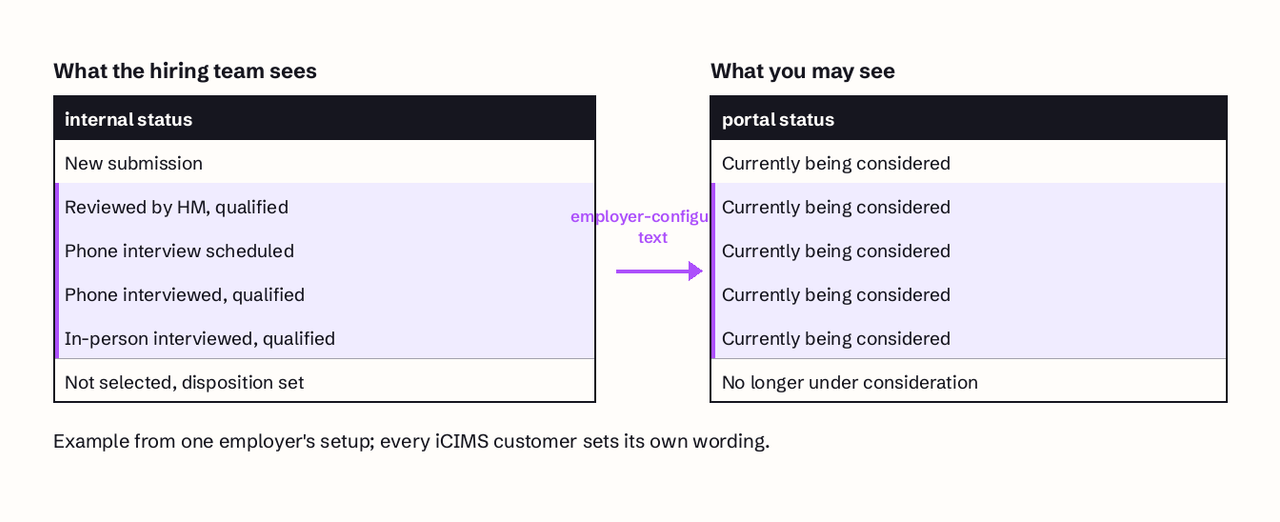
The status stays the same because the candidate-facing text only changes when someone changes your record, and many internal steps never touch it. Recruiters and hiring managers work in an internal view of iCIMS with far more detailed statuses than the one sentence you see.
A 2021 iCIMS training for hiring managers at one employer shows this clearly. Each candidate has a person profile and a separate "recruiting workflow profile," which is that person attached to a specific job. From the workflow profile, a green button advances the candidate and a red button rejects them. The internal statuses at that employer included "application reviewed by hiring manager, qualified," "phone interview scheduled," "phone interviewed, qualified" and "in-person interviewed, qualified." The trainer also told hiring managers the statuses were optional: "it won't hurt anything if you don't use these statuses" (FREE Training on YouTube).
That is the key point for a job seeker. If a hiring manager reviews you, phones you, or puts you on hold, your portal can still read "you are currently being considered for this job" the whole time. The text only reliably changes at the ends: when you are rejected, withdraw, or reach an offer or onboarding stage.
How does iCIMS move a candidate from considered to rejected?
A rejection in iCIMS is a deliberate action by a recruiter or hiring manager, and the notice you receive is often delayed on purpose. In the same training video, rejecting a candidate opens a screen that asks for a disposition reason, which the trainer warns is a permanent record. The reviewer can then tick "send delayed email notice," which at that employer held the rejection email for 137 hours so a candidate would not get a rejection right after walking out of an interview. The email itself is a template the employer chooses.
Three practical consequences follow:
- A rejection may already exist while your portal still shows you as considered, for 137 hours (about 5.7 days) at the employer in the video, and for whatever delay other employers set.
- The rejection email comes from the employer's template, not from iCIMS, so wording varies widely.
- Because the disposition reason is recorded internally, asking a recruiter for feedback is reasonable, though many will not share it.
An iCIMS administrator walks hiring managers through the recruiter-side view of a candidate: the recruiting workflow profile, the optional review and interview statuses, and the rejection screen with its disposition reason and delayed email notice.
Worked example: is your wait normal?
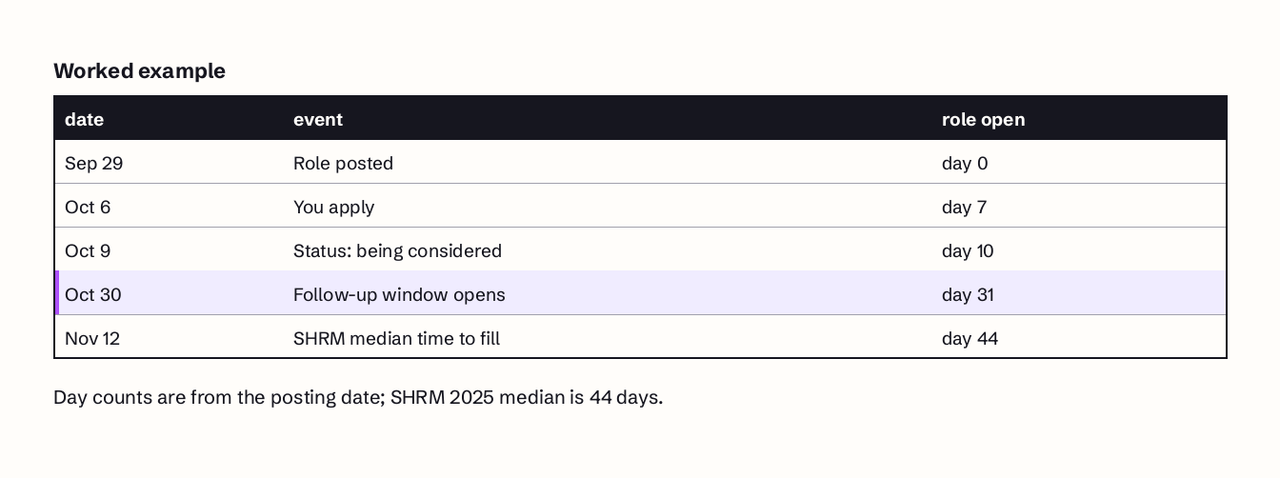
Use the employer's likely time to fill as your yardstick, not the status. Here is one application worked through with real dates.
- The role was posted on September 29.
- You applied on October 6, 7 days after posting.
- On October 9 the portal changed from "Application submitted" to "You are currently being considered for this job."
- Today is November 12.
You are 37 days past your application and 34 days past the status change. The role itself has been open 44 days, exactly SHRM's 2025 median time to fill for nonexecutive roles. So a typical hire for this role would be landing about now. That makes three explanations likely: you are still in a long shortlist, someone else is at offer stage and you are being held as a backup, or the requisition has slowed or been put on hold.
The math also tells you what to do. At 7 to 14 days after the status change, do nothing except keep applying elsewhere. At about 21 days, one short follow-up to a named recruiter or hiring manager is reasonable. Past the role's 44th day with no contact, treat the application as unlikely and spend your energy on newer roles, without withdrawing.
| Days since you applied | What it usually means | What to do |
|---|---|---|
| 0 to 14 days | Screening has not finished | Keep applying elsewhere |
| 15 to 21 days | Shortlists and first screens | Prepare, check spam folder |
| 21 to 44 days | Interviews for the shortlist | One short follow-up |
| 45 days or more | Likely backup or stalled role | Move focus, do not withdraw |
"Currently being considered" vs "under review" and "no longer under consideration"
These iCIMS labels differ in who acted and whether the outcome is final. The exact wording depends on the employer, but the pattern below covers what you will most often see on an iCIMS dashboard.
| Portal text | Who acted | Final? | Your next move |
|---|---|---|---|
| Application submitted or received | Nobody yet | No | Wait, keep applying |
| Under review | Usually a recruiter | No | Be ready to respond fast |
| Currently being considered | Nobody has rejected you | No | Follow up once at about 21 days |
| Interview or scheduling | Hiring team | No | Confirm time and prepare |
| No longer under consideration | Recruiter or HM rejected | Yes, for this job | Apply to other roles there |
| Withdrawn | You | Yes | Reapply only if the posting allows |
The important distinction is between "under review" and "currently being considered." Some employers use "under review" for the stage when a recruiter is actively screening and "being considered" once you pass that screen; others use "being considered" as the default from day one. If your status changed from one to the other, that change is the signal. If you saw "being considered" immediately after submitting, it is probably the default text.
Should you withdraw, follow up, or wait?
Follow up once, keep waiting in parallel, and almost never withdraw. The iCIMS dashboard may show a "Withdraw" button in the Actions column next to completed applications, and iCIMS says clicking it will "remove your name from consideration for the job" (iCIMS candidate FAQ). That action is the one status change entirely in your control, and it is hard to undo.
There is also a regulatory reason the word "considered" matters. For US federal contractors, the OFCCP's definition of an Internet Applicant includes that the contractor "considers the individual for employment in a particular position" and that the person does not remove themselves from consideration before an offer (41 CFR 60-1.3). Those contractors must keep applications and expressions of interest for at least two years, or one year if they have fewer than 150 employees or no contract of at least $150,000 (41 CFR 60-1.12). Other employers covered by Title VII keep application records for at least one year (29 CFR 1602.14). In plain terms, your application stays on file whether or not you withdraw, so withdrawing gains you nothing unless you have accepted another offer.
When you do follow up:
- Wait until about 21 days after the status change, or 5 business days after any interview.
- Find a named person: the recruiter on your confirmation email, or the hiring manager for the team.
- Send three or four sentences: the role and requisition ID, the date you applied, one line of fit, and a question about timing.
- Do not reapply to the same requisition to "refresh" your status; it creates a duplicate record and does not move you up.
Our guide on how to follow up on a job application has templates, and if you have taken another offer, how to withdraw a job application shows how to do it without burning the bridge.
The deeper problem is that a portal status is a one-way channel: the employer decides what you see and when. JobFinder AI finds roles that match your resume, keeps track of where each application stands across employer portals, and helps you reach the hiring manager directly, so a status that has not moved in a month is not your only line to the team. You can try JobFinder AI here.
Common pitfalls with iCIMS statuses
Most stalled iCIMS applications stall for reasons the candidate can check. Run through these before you assume the worst.
- Emails in spam. iCIMS warns that spam filters can trap application confirmations and interview invitations; mark the employer's messages as not spam.
- Unsubscribing from everything. The "Unsubscribe from Mass Email Communications" option can stop notifications about interviews and future considerations, and iCIMS recommends against it.
- A resume the parser could not read. iCIMS advises putting your name and contact details in the body of the resume, not the header or footer, and keeping important text out of tables, text boxes and images. An applicant tracking system that mis-parses your resume can leave a recruiter with an empty-looking profile.
- An unsupported email address. The iCIMS candidate guide notes that addresses with accented characters are not supported (iCIMS Candidate Guide).
- An unfinished application. An incomplete application shows a "Continue Application" button in the Actions column. If you see it, you never actually applied.
- Treating the portal as the source of truth. An email or call from the recruiter always outranks the portal text. If you have been invited to interview and the portal still says you are being considered, you are moving forward.
FAQ
Is "you are currently being considered for this job" a good sign?
It is a neutral to mildly good sign. It confirms your application is active and has not been rejected for that job. At some employers it appears only after a recruiter screen, which is better news; at others it is the default text for every applicant. If it changed from another status, such as "under review," treat the change as progress.
Does "currently being considered" mean the hiring manager has seen my resume?
Not necessarily. Hiring managers in iCIMS can review, phone screen and even interview candidates without changing the text you see, because their internal statuses are separate and often optional. Only a direct message from the employer confirms that someone has read your application.
How long does an iCIMS application stay "currently being considered"?
It stays until someone rejects you, you withdraw, or you move to an offer stage, which can be several weeks. SHRM's 2025 benchmark puts the median time to fill at 44 days for nonexecutive roles, so a status that has not moved after about 42 days usually means you are a backup or the role has stalled.
Does "under review" mean I was rejected?
No. "Under review" usually means a recruiter or screening step is evaluating your application. A rejection on iCIMS normally shows as "no longer under consideration," "not selected" or similar wording, often after a delay the employer sets for the rejection email.
Should I withdraw my application or follow up?
Follow up instead of withdrawing. Send one short email to a named recruiter or hiring manager about 21 days after the status change. Withdraw only if you have accepted another offer, because withdrawing removes you from consideration for that job and your application record stays on file anyway.