6 Best Job Application Autofill Tools (Compared)
Six job application autofill tools compared: free extensions like Simplify and Careerflow, Chrome autofill, auto-apply bots, and Jobfinder AI.
TL;DR: For most job seekers the shortlist is Jobfinder AI (it finds roles that fit your CV, fills supported employer forms and emails the hiring manager), Simplify Copilot (the strongest free browser extension, with Workday, Greenhouse, iCIMS, Taleo and Lever support), Careerflow (a free autofill extension that never submits without you) and Chrome's built-in autofill (free, but only basic contact fields). Auto-apply bots such as JobCopilot and LazyApply are a different product: they submit for you, so read the difference below before you pay.
Try Jobfinder AI on your own search: upload your CV, review your first matches and approve your first batch of outreach before anything is sent.
Job application autofill is software that copies your saved profile (name, contact details, work history, education, links and common answers) into an employer's online application form, so you stop retyping the same details for every job. The best job application autofill tool depends on how much you want automated. If you only want forms filled while you click through them yourself, a free extension such as Simplify Copilot or Careerflow covers it, and Simplify lists Workday, Greenhouse, iCIMS, Taleo, Avature, Lever and SmartRecruiters among the portals it supports. If you want the roles found, the forms filled and a person at the company contacted, Jobfinder AI does all three, and it only submits a form when every required answer can be given truthfully from your profile. Chrome's own autofill is free and already installed, but it fills contact fields, not work history. Prices below were read on each vendor's site on November 14, 2026.
What is the difference between autofill and auto-apply?
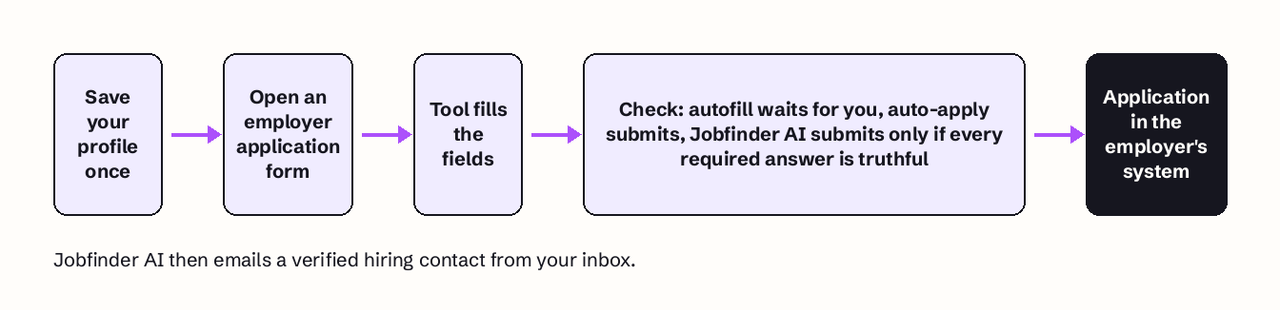
Autofill fills the form and you submit it; auto-apply finds jobs and submits applications without you clicking submit. That one difference decides how much control you keep, how much you pay and how much can go wrong.
- Autofill (Simplify Copilot, Careerflow, Chrome autofill) runs in your browser. You open the application, press a button, check every field and press submit yourself. Careerflow states it plainly: "Nothing is sent without you confirming it."
- Auto-apply (JobCopilot, LazyApply) runs on its own. You set criteria once and the tool sends applications on a daily quota, such as LazyApply's 15/day or 150/day quota.
- Agent with guardrails (Jobfinder AI) sits between them. It picks roles that match your CV, fills supported employer forms, and stops when a required question cannot be answered truthfully from what you gave it. It also emails a verified hiring contact from your own inbox, and you approve the first batch of outreach.
For the wider category, see the best AI job application tools.
How we judged each job application autofill tool
We ranked each tool on five criteria, in this order:
- Truthful answers. Does the tool stop, or let you stop, before something false is submitted under your name?
- Portal coverage. Does it work on the applicant tracking systems most employers use, Workday above all, plus Greenhouse, Lever, iCIMS and SmartRecruiters?
- What happens after the form. A filled form puts you in the employer's system. Does the tool do anything to get a human to read it?
- Free tier and price. What can you do without paying, and what does the paid plan cost, from the vendor's own pricing page?
- Data handling. What does the tool store, and what has the vendor committed to?
Jobfinder AI ranks first on criteria 1 and 3: it is the only tool here that both refuses to submit unverifiable answers and contacts the hiring manager. Simplify Copilot ranks first on criterion 2 and 4 among pure extensions.
Summary table: all six at a glance
| Tool | Type | You press submit? | Portals named by the vendor | Free tier | Paid price |
|---|---|---|---|---|---|
| Jobfinder AI | Matching, form filling and hiring-manager email | Submits only when every required answer is truthful; you approve the first outreach batch | Reads openings from Greenhouse, Lever, Ashby, Workday, SmartRecruiters career sites | No public pricing page | Shown at signup |
| Simplify Copilot | Browser autofill extension | Yes | Workday, Greenhouse, iCIMS, Taleo, Avature, Lever, SmartRecruiters (100+ total) | Unlimited autofill, free | Not needed for autofill |
| Careerflow Autofill | Chrome autofill extension | Yes | Workday, Greenhouse, Lever and more | Free autofill | Not listed on autofill page |
| Chrome autofill | Built into the browser | Yes | Any form with standard contact fields | Free | None |
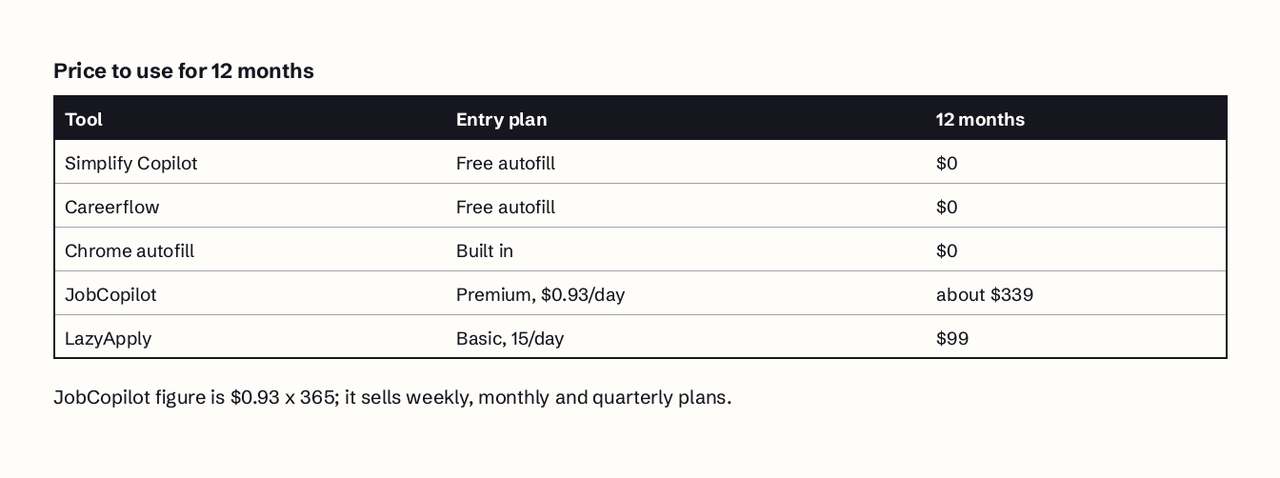
| JobCopilot | Auto-apply service | No (can save applications for review) | Not listed on pricing page | None listed | From $0.93/day |
| LazyApply | Auto-apply service | No | Greenhouse, Dice, Indeed, ZipRecruiter | None listed | From $99/year |
1. Jobfinder AI
Jobfinder AI is an AI job finder that, in its own words, "reads your CV, finds open roles that fit it, fills in the employer's application form, and emails the hiring manager from your own inbox."
What it does for autofill. For supported employer forms it fills the application from your profile, and "it only submits when every required answer can be given truthfully from what you provided; anything it cannot answer honestly is left for you." That rule is the reason it is first here: the most common way an autofill tool hurts you is by putting a wrong answer (a work authorization status, a start date, years of experience) into a field you never looked at.
What it does after the form. It identifies a verified hiring contact, drafts a tailored email that is sent from your own inbox, and schedules follow-ups after 3 days and again after 7 days if nobody replies. You approve your first batch of outreach before anything is sent.
Where it finds jobs. It collects live openings from employer career sites and applicant tracking systems such as Greenhouse, Lever, Ashby, Workday and SmartRecruiters, and every listing links back to the employer's own posting.
Best for: an active search where you want fewer, better-fitting applications and a real person to see them.
Pricing: there is no public pricing page (we checked on November 14, 2026); pricing is shown when you create an account.
Limits: it is not a browser extension, so it will not fill a form you open by hand on an arbitrary site. It fills supported employer forms only.
2. Simplify Copilot
Simplify Copilot is a free browser extension that fills job applications from a profile you set up once. Simplify says it autofills "on over 100 job boards and application portals including Workday, Greenhouse, iCIMS, Taleo, Avature, Lever, and SmartRecruiters" (Simplify).
Verified detail: Simplify states there is "no limit on how many applications you can submit with Copilot" and that autofill, the application tracker, job matches and the basic resume builder are "features we commit to keeping free for everyone." Every application you submit with it is saved to a dashboard automatically, and its AI drafts answers to questions such as "why are you a good fit for this role?" Simplify reports 200M+ applications submitted with Copilot.
Best for: students and new graduates applying in volume, and anyone who wants the widest free portal coverage.
Pricing: free for autofill and tracking (Simplify).
Limits: you still find the jobs and press submit on each one, and the AI-written answers need your edit before they go in. For other ways to set up this workflow, see our Simplify alternatives.
3. Careerflow Autofill
Careerflow Autofill is a Chrome extension that detects application forms and fills them from your Careerflow profile. Careerflow names Workday, Greenhouse and Lever among the supported platforms (Careerflow).
Verified detail: the flow is four steps: complete your profile (upload a resume, add work history, education and contact details), browse jobs, click Autofill, then review and submit. Fields the tool cannot fill are flagged for manual input, and submitted applications are logged in Careerflow's Job Tracker. Careerflow's FAQ: "Autofill populates the form, but you review and submit. Nothing is sent without you confirming it."
Best for: people who also want Careerflow's LinkedIn optimizer, cover letter writer and mock interviews in the same account.
Pricing: autofill can be set up for free, per the "Set Up Autofill for Free" offer on its autofill page (Careerflow).
Limits: Chrome only, and the portal list on the page is shorter than Simplify's.
4. Chrome's built-in autofill
Chrome autofill is the free form filler built into Google Chrome, and the one most "best autofill" lists leave out. It fills saved names, addresses, contact info, passwords and payment details, and it can use the name and email from your Google Account (Google Chrome Help).
Verified detail: you manage it in Chrome under More, then Passwords and autofill. The save-and-fill setting is on by default for contact info, identity docs and travel, you need to be signed in to your Google Account, and Google states that "Chrome never shares your info without your permission." Not all autofill features are available in all regions.
Best for: a quick first pass on every form, whatever tool you use next.
Pricing: free.
Limits: it does not know your work history, education, links or screening answers, which are the slow part of a Workday application. Treat it as a complement to the tools above, not a replacement.
5. JobCopilot
JobCopilot is an auto-apply service: you train an AI copilot on your preferences and it applies to matching jobs on its own. It also lets you save applications for review instead of sending them.
Verified detail: Premium starts at $0.93 per day with 1 copilot and up to 20/day job matches; Elite starts at $1.05 per day with 3 copilots, up to 50/day matches, resume tailoring per application and credits to contact hiring managers. Weekly, monthly and quarterly plans are available (JobCopilot pricing).
Best for: people who want applications sent while they are away and accept less control per application.
Pricing: from $0.93 per day, about $339 per year if paid daily for 365 days.
Limits: it is not autofill in the strict sense: you are not on the form when it is submitted. We compared it in detail in Jobfinder AI vs JobCopilot.
6. LazyApply
LazyApply is an auto-apply tool that says it applies automatically on "platforms like Greenhouse, Dice, Indeed and Ziprecruiter," with an AI it calls Job GPT filling the forms (LazyApply pricing).
Verified detail: Basic is $99 per year for 15/day applications and 1 resume profile; Premium is $149 per year for 150/day applications and 5 resume profiles; Ultimate is $999 per year. It offers refunds requested within 30 days, and the plan has to be attached to a Gmail address. It can also send referral emails to employees at the companies you apply to.
Best for: high-volume searches on the platforms it names.
Pricing: from $99 per year.
Limits: a daily quota of 150 applications rewards volume, and nothing on its pricing page describes a check that each answer is true. Read our review of robo-apply tools before choosing a volume tool.
Does autofill work on Workday applications?
Yes, with limits. Simplify Copilot and Careerflow both name Workday as a supported portal. Workday forms are long and split across several pages, and each employer configures its own questions, so expect the tool to fill standard sections (contact details, work history, education) and leave employer-specific screening questions for you. Check every page before you submit. Jobfinder AI reads openings from Workday career sites and fills supported employer forms, leaving any question it cannot answer truthfully to you. Once you have applied, our guide to job application tracking software covers keeping the status of each Workday account in one place.
Is it safe to give an autofill extension my resume data?
It can be, if you check three things first. A Chrome extension is bound by the Chrome Web Store Limited Use policy: it may only collect data "necessary for the extension's disclosed single purpose," and selling user data to advertising platforms or data brokers is prohibited (Chrome for Developers). Before installing:
- Read the extension's Chrome Web Store listing and its privacy policy, and confirm the stated purpose is job applications.
- Leave out what no application needs at the first stage: your Social Security or national ID number, bank details and date of birth.
- Prefer tools that let you see and submit the form yourself, or that, like Jobfinder AI, leave unverifiable answers to you.
How to choose the right one for your search
Start from the job you want done, not the feature list:
- Retyping is the only pain: install Simplify Copilot and keep Chrome autofill on for contact fields.
- You also want a LinkedIn review and interview practice in one account: Careerflow.
- Your real problem is silence after you apply: Jobfinder AI. This is our recommendation for an active search, because a filled form only gets you into the applicant tracking system, and a verified hiring-manager email puts your experience in front of the person who decides.
- Volume matters more than control: JobCopilot or LazyApply, with review settings switched on.
Whichever you choose, check 5 fields before every submit: contact details, work authorization, job dates, salary, and any AI-written answer.
FAQ
Can employers tell if you used autofill?
Not from the form itself: an autofill tool types into the same fields you would, and the employer receives the same data. What employers do notice is the result: a wrong date, a mismatched job title, or a generic AI answer that does not fit the role. Review every field and the problem goes away.
Is autofill the same as auto-apply?
No. Autofill fills the form and you press submit. Auto-apply tools such as JobCopilot and LazyApply find jobs and submit applications for you on a daily quota.
Is there a free extension that autofills job applications?
Yes. Simplify Copilot is free with no limit on applications, Careerflow autofill can be set up for free, and Chrome autofill is free and built in.
Can autofill answer screening questions?
Partly. Simplify and other tools use AI to draft answers to questions like "why are you a good fit," but those drafts need your edit. Jobfinder AI does not submit when a required answer cannot be given truthfully from your profile; it leaves that answer to you.
Start with fewer, better applications
Autofill saves typing; it does not get you read. If you want the roles that fit your CV found, supported forms filled only with true answers, and an email sent from your own inbox to a verified hiring contact, start with Jobfinder AI. You review your matches and approve your first batch of outreach before anything is sent.